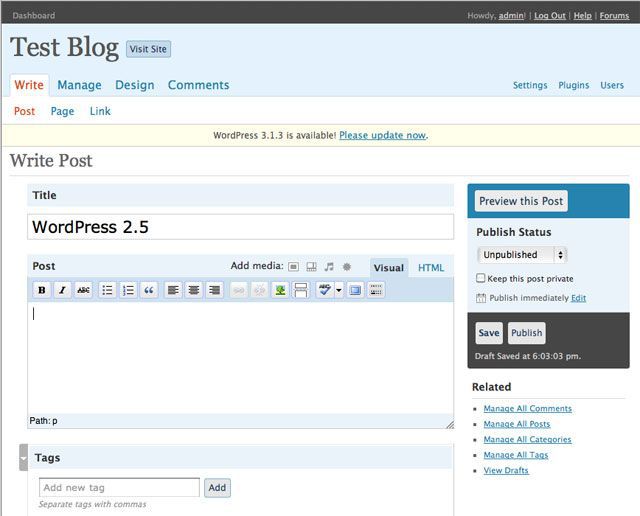

Wordpress 2.5 Released! Come Get Yours

By BLOGBloke March 29th, 2008 | 114 Comments

Wordpress 2.5 Released! Come Get Yours

Of course the big news today is Wordpress 2.5 has just been released:

WordPress 2.5, the culmination of six months of work by the WordPress community, people just like you. The improvements in 2.5 are numerous, and almost entirely a result of your feedback: multi-file uploading, one-click plugin upgrades, built-in galleries, customizable dashboard, salted passwords and cookie encryption, media library, a WYSIWYG that doesn’t mess with your code, concurrent post editing protection, full-screen writing, and search that covers posts and pages. You can read more about it here.

I think I’ll wait for my plugins to catch up and let those brave enough to test the waters be the guinea pigs.

For those who us who are relatively new to Wordpress, switching over to a brand new interface whilst still trying to grasp the fundamentals of the previous version might not be a smart idea.

Neverthless it will only be a matter of time before this Bloke decides to take the plunge. For those of us who are willing to venture into uncharted territory you can find the upgrade instructions here.


Filed under: Miscellaneous Blog Tips, Wordpress ,

Keep it Real with Blog Bloke Keep it Real with BLOGBloke, the Original Blog Tips and Social Media Guide. New readers can read more about me here. Feel free to contact me with any questions you may have and if you enjoyed this article please subscribe below, share with friends or leave a comment. CHEERS!

Share the Knowledge: Share this article with friends..

 
These icons link to social bookmarking sites where readers can share and discover new web pages.
  • TwitThis
  • Facebook
  • GoogleBuzz
  • StumbleUpon
  • Digg
  • del.icio.us
  • FriendFeed
  • Live
  • YahooMyWeb
  • Sphinn
  • LinkedIn
  • Technorati
  • Don't Miss another Blog Tip from BLOGBloke and Keep it Real..

    Subscribe here to the Better Tips Newsfeed!   

    Follow @BLOGBloke on Twitter for More Tips and News!

    Connect with BLOGBloke on Facebook

    What Next? Read More Tips From BLOGBloke:

            Got an Opinion? (Add Yours Now)

    Ok Blokesters it's your turn to tell me what you think, ask a question or suggest a blog tip. Don't forget the comments policy and I'm looking forward to reading what you have to say.

    There are 114 Comments so far to “Wordpress 2.5 Released! Come Get Yours”

    *Skip to the comments form
    1. So far so good, of course if you read my post, between the lines, lol, you will notice I have not upgraded my main sites yet. I am working my way up to those. But, everything looks great so far.

      Thanks for the mention !

      David Cooley’s last blog post..Wordpress 2.5 Upgrade

      [ Reply..]

    2. Prudent advice there David.

      [ Reply..]

    3. It looks like I may wait a bit. See how all the guinea pigs do. But based on Coders’ results, Im sure I don’t have much to worry about. I am curious about the tags though. I’ll keep reading up on this upgrade and see what happens.

      Im still thinking… “If it ain’t broke….”

      TheYoungGuy’s last blog post..Tivo meets YouTube

      [ Reply..]

    4. That’s wise thinking for a young guy ;-)

      [ Reply..]

    5. I actually missed the fanfare by over 16 hours ! Just got it installed.

      The WordPress OpenID plugin doesn’t work properly for me, so I’m deactivating it whilst looking around for another.

      Jaffer’s last blog post..ManiaRavings is OpenID Enabled

      [ Reply..]

    6. Had just got 2.3.3 to be useable, went to version 2.5. For me it is unusable as the Manage Posts

      and Pages section changed, eliminating the very best features of that section. Any way to easily go back to 2.3.3 , otherwise will need to find another program that suits my needs. Not a knock against WordPress per-se, once one has the basics learned, it really purrs. I depended on the
      ease of the ID access, and access to view the eight major blog segments I have. No longer can do it the same way.

      The Talker’s last blog post..# 11 Autism Ray of Hope and Progress: Jenny McCarthy

      [ Reply..]

    7. I upgraded last night and made all the changes in about 20 minutes. The plugin that broke was my OneClick Installer. So, I’m feeling pretty good about myself at this point.

      For those still waiting to make the change, be sure to back everything up, including your database, before you upgrade. There are changes to table structure with this upgrade. So, in case things don’t go well you want to be able to restore things to your starting point.

      [ Reply..]

    8. You’re a braver man than I am Lee.

      [ Reply..]

    9. Thanks for the opinion Talker. The more that we share our experiences we can save others possible grief. I don’t know if Wordpress has a way to roll it back without reinstalling. Perhaps your blog host provider can help you.

      [ Reply..]

    10. Jaffer, you are also a braver man than me. I salute you :-)

      [ Reply..]

    11. Bloke, One of the most impressive and essential features of WordPress is Exporting your Posts and comments to the .xml file.

      I have noticed that even if my database is kaput or deleted, or my hosting account is all cleaned up, and WordPress has disappeared, that .xml file is enough to bring back all my posts and comments and get me started where I left.

      It’s the easiest and simplest way to prevent headaches !

      Jaffer’s last blog post..ManiaRavings is OpenID Enabled

      [ Reply..]

    12. True, but the school of hard knocks has proven that it’s prudent to play it safe when it comes to upgrades with any software. I’ve been stung enough times from jumping on the upgrade bandwagon that it’s made me a little skittish.

      Although this upgrade could be argued that it’s not major (i.e. it’s not a version 3.0) there are enough significant changes that I would rather wait to see how the dust settles first.

      After all it is working just fine for my liking and I’m quite happy with the way things are, and I don’t see any compelling changes that would make me want to upgrade right now. Perhaps in a couple of months from now when 2.5.1 is released (to get rid of the bugs) and all of my plugins have upgraded accordingly I might reconsider that notion.

      But for now I think I will stay with the status quo.

      [ Reply..]

    13. awesome site brotha http://bit.ly/1jshln

    14. @Gaia Herbs, some look like downtown Las Vegas in the evening. http://bit.ly/2ub7iQ

    15. @Gaia Herbs, some look like downtown Las Vegas in the evening. http://bit.ly/2ub7iQ

    16. @CFI, @hospitalera … my head was spinning when I wrote it ;-) http://bit.ly/1CQix9

    17. RT @BLOGBloke: 10 Reasons Why I Don’t Like Your Blog http://bit.ly/2TRLSx

    18. 10 Reasons Why I Don’t Like Your Blog http://bit.ly/2TRLSx

    19. @Humayon, if you are just a blogspot user then you don't need to bother with dns settings. But I still recommend ge… http://bit.ly/1fDYre

    20. @hari saryono, I wrote an article about why we should not play into terrorists hands by linking to these horrific v… http://bit.ly/2aTKBw

    21. @InternetMarketingMentor, here's another analogy for you. Your blog is your permanent home and social networks are … http://bit.ly/4hZtE

    22. Optimize Your Blog - Making Your Blog Search Engine Friendly http://bit.ly/4A9Go5

    23. @Mike, glad you liked it. If you're serious about blogging then Wordpress is the way to go. http://bit.ly/33GQUp

    24. via @BLOGBloke: Hi There! Thanks for following. Why not ask me a question or for more blog tips visit http://tinyurl.com/5zjajb. Cheers!

    25. @Michelle, you do not need a subdomain for it to work. A subdomain is also a bad idea for SEO. You need to go over … http://bit.ly/5Z3vbE

    26. @Justin Gill .. thanks for saying so Justin. It always feels great to hear from another happy customer. :-)

      Cheers! http://bit.ly/5Z3vbE

    27. blog hating at http://www.blogbloke.com/10-reasons-why-i-dont-like-your-blog was just pinged to 91 Services!

    28. @Kay, I never thought of it that way http://bit.ly/1CQix9

    29. @humglum http://www.blogbloke.com/moving-wordpress-blogger/ basically… no. doesnt look like it'll happen.

    30. @BLOGBloke,

      I decided to get rid of the Blogger redirect as the redirect via modification to .htaccess works, t… http://bit.ly/5Z3vbE

    31. @Michelle, redirect speeds will depend on the blog host's servers and your internet connection. You only need to pa… http://bit.ly/5Z3vbE

    32. @drugi, you mean "you can please some of the people all of the time and all of the people some of the time, but you… http://bit.ly/4CvJh7

    33. Finding Your Blog Voice http://bit.ly/5LD5kQ

    34. @zarazek, don't get your domains through Wordpress. Use GoDaddy or something similar. http://bit.ly/1fDYre

    35. Saw an advertisement for Moving Blogger to Wordpress Service. Why not save your money and read my free guide? http://bit.ly/6rFYFE They do

    36. hmm.. informative )) http://bit.ly/6krJX6

    37. I should notify my girlfriend about your post. http://bit.ly/6iqFfC

    38. hello everybody, how are you all doing.i am liking this web sight i might start staying on it more. me i stay sick … http://bit.ly/6krJX6

    39. @Cdathy Tibbles, I host images on my wordpress.com account. Let me know it goes. I always like to hear from happy c… http://bit.ly/5Z3vbE

    40. @BLOGBloke, Yeh, I had a domain from a different comapny but Wordpress said I still had pay them to be able to link… http://bit.ly/1fDYre

    41. @zarazek, so if I understand you correctly your blog was being hosted by Wordpress and then they insisted on chargi… http://bit.ly/1fDYre

    42. I'm very happy with the refinements I made to the blog. What do you think? http://www.blogbloke.com/

    43. How to Produce Your Own Podcast http://ff.im/-dm32o

    44. "10 Reasons Why Twitter Is So Popular" ( http://bit.ly/8CM5gX )

    45. Updated my Blokester Buttons for 2010. Grab yours now .. http://www.blogbloke.com/introducing-new-blokester-buttons/

    46. How to Make Professional Podcast Videos for Your Blog (Vlog) http://bit.ly/7EHvN8

    47. RT @projournalist: How to Make Professional Podcast Videos for Your Blog (Vlog) http://bit.ly/7EHvN8

    48. RT @journtoolbox RT @projournalist: How to Make Professional Podcast Videos for Your Blog (Vlog) http://bit.ly/7EHvN8

    49. @BLOGBloke - really ok - am trying to pull off this from your blog http://bit.ly/5Zv5kW (thank you so much for documenting this - it rocks)

    50. @BLOGBloke - do you think I could use this service to redirect or park my domain like you mentioned in http://bit.ly/5Zv5kW

    51. Great tutorial on migrating your blog from #blogger to #wordpress. http://bit.ly/Nlr2k

    52. @FijiLomalagi my email is at the bottom of my blog http://www.blogbloke.com/

    53. @Kwame, you will have to play around with the Apache code .. http://bit.ly/5Z3vbE

    54. @Ankit_A see if this helps.. http://bit.ly/Nlr2k

    55. @drewmillikin My technical skills are limited, but I found this post to be very helpful: http://bit.ly/7LY764. My advice: pull the trigger.

    56. @Adam Johnson .. it was my pleasure and glad it worked for you .. http://bit.ly/5Z3vbE

    57. @gopmommy Your domain name redirection is done on your hosting service. Check this tutorial http://is.gd/8TXkI

    58. @stepfanieb Check #6. http://bit.ly/Nlr2k

    59. RT @BLOGBlokeTips How to Make Professional Podcast Videos for Your Blog (Vlog) http://bit.ly/2JgxLd

    60. @Wade, like I mentioned earlier in the article the odd link might get changed during the import process into Wordpr… http://bit.ly/5Z3vbE

    61. @John Daniels, not sure if I understand your question. Can you be more specific? http://bit.ly/cjF9ac

    62. 8 Twitter Tips to Promote Your Blog - We should be leveraging Twitter to drive traffic over to our blogs – not the … http://ow.ly/16Uu8y

    63. Twitter_Tips: Should you use a "TwitterRoll" to promote your blog? http://j.mp/cO1yKB: Twitter_Tips: Should you us… http://bit.ly/95gYJT

    64. RT @Twitter_Tips: Should you use a "TwitterRoll" to promote your blog? http://j.mp/cO1yKB

    65. Should you use a "TwitterRoll" to promote your blog? http://j.mp/cO1yKB http://url4.eu/21u9n

    66. RT @Twitter_Tips: Should you use a "TwitterRoll" to promote your blog? http://j.mp/cO1yKB

    67. 8 Twitter Tips to Promote Your Blog http://bit.ly/bLbgz2

    68. RT @mparent77772: 8 Twitter Tips to Promote Your Blog http://bit.ly/bLbgz2

    69. 8 Twitter Tips to Promote Your Blog http://bit.ly/bLbgz2 (via @mparent77772)

    70. RT @mparent77772: 8 Twitter Tips to Promote Your Blog http://bit.ly/bLbgz2: RT @mparent77772: 8 Twitter Tips to Pr… http://bit.ly/dortmq

    71. RT @mparent77772
      8 Twitter Tips to Promote Your Blog http://bit.ly/bLbgz2: RT @mparent77772
      8 Twitter Tips to Pr… http://bit.ly/diYc9B

    72. @Dorinda, I'm on pay & talk with auto top-up and on the phone with Telus (Philippines) as I write this. My daughter… http://bit.ly/1BH6lz

    73. @Kristy@MyPetSavings.com, I'm assuming you are referring to the apache code above in which case yes, if you want yo… http://bit.ly/5Z3vbE

    74. Calling all Blokesters: I changed the blog background .. please let me know what you think http://www.blogbloke.com/

    75. @BLOGBlokeTips Looks clean, sir. I need a comparison, though~ http://bit.ly/d4jZWu

    76. 10 motivos por los que twitter es tan popular…..
      Estais de acuerdo? http://www.blogbloke.com/twitter-popular/

    77. Beware of Geeks Bearing Online Gifts http://bit.ly/5iaUha

    78. @neha, yes I recommend GoDaddy so you can use this tutorial AND they're cheaper too. http://bit.ly/5Z3vbE

    79. @neha .. no, I would not recommend GoDaddy for hosting your blog. I would look elsewhere. I use http://hexahost.com… http://bit.ly/5Z3vbE

    80. @BLOGBloke, great. I just emailed Hexahost to confirm that, but did they install Wordpress for you when you purchas… http://bit.ly/5Z3vbE

    81. @BLOGBloke, ok i have taken a look around for a web host… and found 3 options, hexahost which you told me about, … http://bit.ly/5Z3vbE

    82. 10 Reasons Why Twitter Is So Popular
      http://www.blogbloke.com/twitter-popular/

    83. BLOGBloke just got a facelift. I decided to brighten things up a bit (yes I like blue). Let me know what you think http://www.blogbloke.com

    84. @Julie-Inspired to Write, hi there. Did you read this part?

      Note: If it doesn’t work, open up a wordpress.com … http://bit.ly/5Z3vbE

    85. 10 Reasons Why Twitter Is So Popular http://ff.im/-mBS4r

    86. @Kristina, I'm happy to hear it's working for you but I don't recommend deviating from the instructions in this pos… http://bit.ly/5Z3vbE

    87. @p_money Check out: http://bit.ly/Nlr2k to redirect. As for the new blog there are a few things you can do easily to help with google.

    88. I Love my Pipe http://bit.ly/4mR7zo

    89. What is a Pro Blogger? Setting the Record Straight http://bit.ly/81mzqi

    90. Using the LinkWithin plugin is helping me rediscover posts I've forgotten. I wrote a lot of good stuff if I may say so http://bit.ly/9sIzm5

    91. What does Original Content and Plagiarism mean for Bloggers? http://bit.ly/3Yzmsr

    92. "Better TIPS by Blog Bloke (BLOGBloke)" - http://bit.ly/bgSL6G via @BLOGBlokeTips

    93. 8 Twitter Tips to Promote Your Blog http://bit.ly/c5MwAh

    94. The Importance of Linking: http://bit.ly/2AjVpp Link Long and Prosper!

    95. Mohammad Elsheimy, no big deal. Just go into Google Webmaster Tools and choose your “Preferred Domain”. With or… http://bit.ly/bbzsUk

    96. The Importance of Linking: Link Long and Prosper! http://www.blogbloke.com/on-importance-of-linking/

    97. @BLOGBloke, Yeah, I found it. Google Webmaster -> Site Configuration -> Settings -> Preferred Domain.

      T… http://bit.ly/bbzsUk

    98. How to Make Professional Podcast Videos for Your Blog (Vlog) http://bit.ly/c4Xz6k

    99. Make Money Blogging with Google Adsense http://bit.ly/dgzVTr

    100. @Jennifer, from what I've seen Matt Cutts of Google has done a little backtracking and sidestepping on the issue an… http://bit.ly/ciskW3

    101. RT @BLOGBlokeTips 8 Twitter Tips to Promote Your Blog http://bit.ly/cT7wyV

    102. RT @Twit_Expert @Punflaykids 8 Twitter Tips to Promote Your Blog http://bit.ly/cT7wyV:

    103. RT @Twit_Expert @Punflaykids 8 Twitter Tips to Promote Your Blog http://bit.ly/cT7wyV:: RT @Twit_Expert @Punflayki… http://bit.ly/aXs09N

    104. Keeping Social Media Real with Blog Bloke http://bit.ly/bJtpS6

    105. @jimmymycrushie, if you want a professional blog then Wordpress is the way to go. A personal blog is just fine on B… http://bit.ly/1fDYre

    106. @G.Taylor, just don't forget to give credit to the guy who started it all http://bit.ly/1BH6lz

    107. @Sanya - jimmymycrushie.blogspot.com, this also might help http://www.blogbloke.com/custom-domain-blogger-dns-seo-g… http://bit.ly/5Z3vbE

    108. Online Internet Security - How To Avoid Disaster and Recover if the Worst Should Happen http://bit.ly/c3oMoJ RT @BLOGBlokeTips

    109. Read BLOGBloke to find out why 99% of what THEY tell you is a complete waste of time. http://www.blogbloke.com/ Keep it real.

    BLOGBloke AvatarAdd A Comment .. your avatar (like mine on the right) will magically appear from your social profiles like Twitter or Gravatar. You can also add your comment to your Twitter or Facebook page by clicking on the cool buttons  Share

    Tweet This? Click Here 

    Subscribe to Better Blog Tips and the New Media Newsfeed Subscribe to comments for this post by RSS | TrackBack URL

    You can use these XHTML tags: <a href="" title=""> <abbr title=""> <acronym title=""> <b> <blockquote cite=""> <code> <em> <i> <strike> <strong>

    Subscribe to Better Blog Tips and the New Media Newsfeed Thanks for dropping by and don't forget to Subscribe to the Better TIPS Newsfeed