
Wordpress 2.5 Released! Come Get Yours

Wordpress 2.5 Released! Come Get Yours

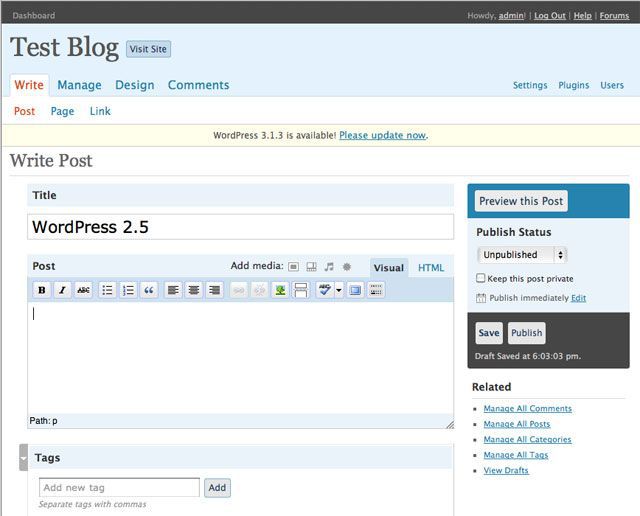
Of course the big news today is 2.5 has just been released:

2.5, the culmination of six months of work by the community, people just like you. The improvements in 2.5 are numerous, and almost entirely a result of your feedback: multi-file uploading, one-click upgrades, built-in galleries, customizable , salted passwords and cookie encryption, media library, a WYSIWYG that doesn’t mess with your , concurrent post editing protection, full-screen writing, and search that covers posts and pages. You can read more about it here.

I think I’ll wait for my to catch up and let those brave enough to test the waters be the guinea pigs.

For those who us who are relatively new to , switching over to a brand new interface whilst still trying to grasp the fundamentals of the previous version might not be a smart idea.

Neverthless it will only be a matter of time before this Bloke decides to take the plunge. For those of us who are willing to venture into uncharted territory you can find the upgrade instructions here.

with your friends if this blog tip has helped your blogging experience


Subscribe to the Newsfeed for even More Great Blog Tips!
Leave a Comment... Tell me what you think, ask a question or suggest a blog tip you want me to write. Don't forget the comments policy and thanks for reading Blog Bloke.

12 Responses so far to “Wordpress 2.5 Released! Come Get Yours”

  1. Blog Tips Helping You to Be a Better Blogger - Blogging - Web 2.0 - New Media

    So far so good, of course if you read my post, between the lines, lol, you will notice I have not upgraded my main sites yet. I am working my way up to those. But, everything looks great so far.

    Thanks for the mention !

    David Cooley’s last blog post..Wordpress 2.5 Upgrade

  2. Blog Tips Helping You to Be a Better Blogger - Blogging - Web 2.0 - New Media

    Prudent advice there David.

  3. Blog Tips Helping You to Be a Better Blogger - Blogging - Web 2.0 - New Media

    It looks like I may wait a bit. See how all the guinea pigs do. But based on Coders’ results, Im sure I don’t have much to worry about. I am curious about the tags though. I’ll keep reading up on this upgrade and see what happens.

    Im still thinking… “If it ain’t broke….”

    TheYoungGuy’s last blog post..Tivo meets YouTube

  4. Blog Tips Helping You to Be a Better Blogger - Blogging - Web 2.0 - New Media

    That’s wise thinking for a young guy ;-)

  5. Blog Tips Helping You to Be a Better Blogger - Blogging - Web 2.0 - New Media

    I actually missed the fanfare by over 16 hours ! Just got it installed.

    The WordPress OpenID plugin doesn’t work properly for me, so I’m deactivating it whilst looking around for another.

    Jaffer’s last blog post..ManiaRavings is OpenID Enabled

  6. Blog Tips Helping You to Be a Better Blogger - Blogging - Web 2.0 - New Media

    Had just got 2.3.3 to be useable, went to version 2.5. For me it is unusable as the Manage Posts

    and Pages section changed, eliminating the very best features of that section. Any way to easily go back to 2.3.3 , otherwise will need to find another program that suits my needs. Not a knock against WordPress per-se, once one has the basics learned, it really purrs. I depended on the
    ease of the ID access, and access to view the eight major blog segments I have. No longer can do it the same way.

    The Talker’s last blog post..# 11 Autism Ray of Hope and Progress: Jenny McCarthy

  7. Blog Tips Helping You to Be a Better Blogger - Blogging - Web 2.0 - New Media

    I upgraded last night and made all the changes in about 20 minutes. The plugin that broke was my OneClick Installer. So, I’m feeling pretty good about myself at this point.

    For those still waiting to make the change, be sure to back everything up, including your database, before you upgrade. There are changes to table structure with this upgrade. So, in case things don’t go well you want to be able to restore things to your starting point.

  8. Blog Tips Helping You to Be a Better Blogger - Blogging - Web 2.0 - New Media

    You’re a braver man than I am Lee.

  9. Blog Tips Helping You to Be a Better Blogger - Blogging - Web 2.0 - New Media

    Thanks for the opinion Talker. The more that we share our experiences we can save others possible grief. I don’t know if Wordpress has a way to roll it back without reinstalling. Perhaps your blog host provider can help you.

  10. Blog Tips Helping You to Be a Better Blogger - Blogging - Web 2.0 - New Media

    Jaffer, you are also a braver man than me. I salute you :-)

  11. Blog Tips Helping You to Be a Better Blogger - Blogging - Web 2.0 - New Media

    Bloke, One of the most impressive and essential features of WordPress is Exporting your Posts and comments to the .xml file.

    I have noticed that even if my database is kaput or deleted, or my hosting account is all cleaned up, and WordPress has disappeared, that .xml file is enough to bring back all my posts and comments and get me started where I left.

    It’s the easiest and simplest way to prevent headaches !

    Jaffer’s last blog post..ManiaRavings is OpenID Enabled

  12. Blog Tips Helping You to Be a Better Blogger - Blogging - Web 2.0 - New Media

    True, but the school of hard knocks has proven that it’s prudent to play it safe when it comes to upgrades with any software. I’ve been stung enough times from jumping on the upgrade bandwagon that it’s made me a little skittish.

    Although this upgrade could be argued that it’s not major (i.e. it’s not a version 3.0) there are enough significant changes that I would rather wait to see how the dust settles first.

    After all it is working just fine for my liking and I’m quite happy with the way things are, and I don’t see any compelling changes that would make me want to upgrade right now. Perhaps in a couple of months from now when 2.5.1 is released (to get rid of the bugs) and all of my plugins have upgraded accordingly I might reconsider that notion.

    But for now I think I will stay with the status quo.

Leave a Comment and Join the Conversation...

Subscribe to RSS comments for this post | TrackBack URL

You can use these XHTML tags: <a href="" title=""> <abbr title=""> <acronym title=""> <b> <blockquote cite=""> <code> <em> <i> <strike> <strong>

I love comments and I'm looking forward to reading yours. Thanks for dropping by and don't forget to Subscribe to the Newsfeed Subscribe to my Newsfeed.